We've moved! — MindVault360 is now SrcForge. Better design, more content & premium notes.

Visit SrcForge →

MindVault360 has moved!

We've upgraded to SrcForge — a faster, more professional platform with better content, premium notes, and a modern design.

Visit us at SrcForge

Friday, May 31, 2024

Functions in Java

(Tap the post to see more)


Methods

Methods in Java are the same as functions in other programming languages. It will execute a block of code whenever it is being called.

Syntax

--Declaring a method ---

Datatype methodname(){

//block of code

}

--calling a method--

methodname()


Types of Methods

1.   Method with parameter without return type.

2.   Method without parameter without return type.

3.   Method with parameter with return type.

4.   Method without parameter with return type.


Parameters and Arguments

They are the values passed during the program's run time.

Java Scope

In Java, variables are only accessible inside the region they are created. This is called scope.

Note: static method, which means that it can be accessed without creating an object of the class, unlike public, which can only be accessed by objects


 Example 01: Method with parameter without return type.


package Methods;


public class method2 {


public static void add(int a, int b) {

int s = a;

int p = b;

int c = s+p;

System.out.println(c);

}

public static void main(String[] args) {

add(50,20);

}

}


Example 02: Method with parameter with return type.

package Methods;


public class method_3 {


static int add(int c, int d) {

return c+d;

}


public static void main(String args[]) {

int m = add(20,30);

System.out.println(m);

}


}


Example 03: Method without parameter without return type

package Methods;

class Methods {

//Method without parameter without return type

public void add() {

int a = 123;

int b = 10;

System.out.println("Addition : " + (a + b));

}

//Method with parameter without return type.

public void sub(int x, int y) {

System.out.println("Subtraction : " + (x - y));

}


//Method without parameter with return type.

public int mul() {

int a = 123;

int b = 10;

return a * b;

}

//Method with parameter with return type

public float div(int x, int y) {

return (x / y);

}

//Recursion Function

public int factorial(int n)//5! =1*2*3*4*5=120

{

if(n==1)

return 1;

else

return (n*factorial(n-1));

}


}

//Type of User Define Methods in Java

public class functions {

public static void main(String args[]) {

Methods o = new Methods();

o.add();

o.sub(123, 10);

System.out.println("Muli : "+o.mul());

System.out.println("Division : "+o.div(123,10));

}

}


← Back Next →

Labels:

Thursday, May 9, 2024

Control Structures in CPP

Control Structures


 Control Structures are just a way to specify flow of control in programs.


  There are three basic types of flow of control, known as:

  • Sequence logic, or sequential flow

  • Selection logic, or conditional flow

  • Iteration logic, or repetitive flow


Sequence Logic


Sequential logic as the name suggests follows a serial or sequential flow in which the flow depends on the series of instructions given to the computer. 


Selection Logic (Branching)


Selection Logic simply involves a number of conditions which decides one out of several written statements.


Iteration Logic (Looping)


It helps to repeat a statement a certain number of times until the condition is satisfied. 


Selection Logic (Branching)


Selection Logic simply involves a number of conditions which decides one out of several written statements.


  • If statement

  • If…else statement

  • If… else if statement

  • switch statement


if statement

« Use the if statement to specify a block of C++ code to be executed if

a condition is true.

Syntax

if (condition)


{

// block of code to be executed if the condition is true


) |


Example 01: 

#include <iostream.h>

void main()

{

if (20 > 18) {

cout << "20 is greater than 18";


Example 02:


#include<iostream>

using namespace std;

int main() {
    int a = 10, b = 20;

    if(a>b)
        cout<<"A is greater";

}


If...else statement

   - Use the if statement to specify a block of  C++ code to be executed

    if a condition is true.   

    Syntax   

    if

    (condition)  

    { // block of code to  be executed if the condition is true)  

    }

else{

//block of code to be executed}


Example 03:


int a = 20;
if (a < 18)

 {
  cout << "Good day.";

else

 {
  cout << "Good evening.";


Output:

Good evening


Example 04:


#include<iostream>

using namespace std;

int main()
{
    int age;
    cout<<"Enter the age : ";
    cin>>age;
   
    if(age>=18)
        cout<<"You're eligible to vote";
       
    else
    cout<<"you are not eligible";
}


If... else if statement

« Use the if statement to specify a block of C++ code to be executed if a condition

is true.

« Use the else statement to specify a block of code to be executed if the condition

is false.

Syntax

if (condition)

{

// block of code to be executed if the condition is true

}

else if(Condition)

{

// block of code to be executed if the condition is false

}

else{

//block of code;

}


Example 05:


int a = 22;
if (a < 10)

 {
  cout << "Good morning.";
}

 else if (a < 20) 

{
  cout << "Good day.";

else

 {
  cout << "Good evening.";
}


Output


Good Evening


Example 06:


#include<iostream>

using namespace std;

int main() {

    int mark;
    cout<<"Enter the mark : ";
    cin>>mark;

    if(mark>=100 && mark >=90)
        cout<<"Your grade is A+";

    else if(mark>= 80 && mark<90)
        cout<<"your grade is A";

    else if(mark >=70 && mark <80)
        cout<<"your grade is B+";

    else if(mark >=60 && mark < 70)
        cout<<"your Grade is B";

    else if(mark >=50 && mark < 60)
        cout<<"your Grade is C";

    else if(mark>=45 && mark<50)
        cout<<"your grade is D";

    else
        cout<<"you are fail";

    return 0;
}


Switch Statement


Use the switch statement to select one of many code blocks to be executed.


Syntax:

switch(expression)

 {
  case x:
    // code block
    break;
  case y:
    // code block
    break;
  default:
    // code block

}


This is how it works:

The switch expression is evaluated once

The value of the expression is compared with the values of each case

If there is a match, the associated block of code is executed


Example 07:

int day = 4;

switch (day) {

case 1:

cout << "Monday";

break;

case 2:

cout << "Tuesday";

break;

case 3:

cout << "Wednesday";

break;

case 4:

cout << "Thursday":

break;

case 5:

cout << "Friday"; 

break;

case 6:

cout << "Saturday"; 

break;

case 7:

cout << "Sunday";


)

Output: Thursday


← Back Next →

Labels:

STORAGE CLASSES in C


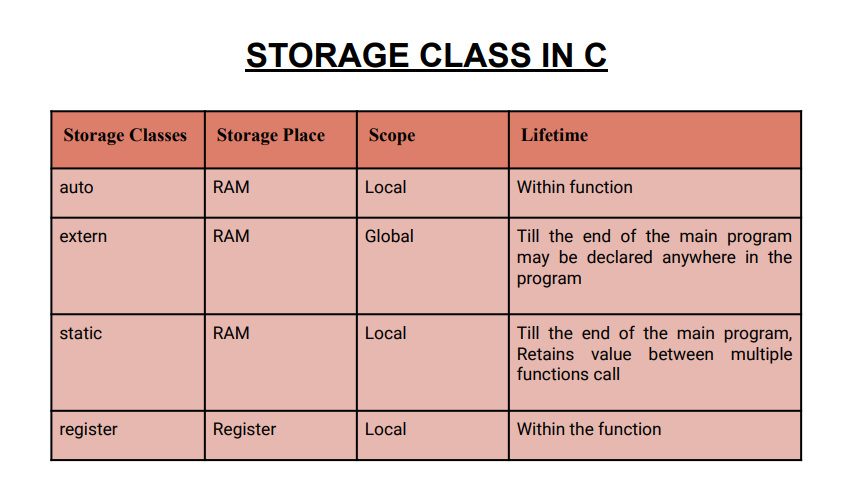
STORAGE CLASSES

These features of the function include scope and visibility.

In other words, A storage class defines the scope and lifetime of variables and/or functions within a program.

Types:

  • Automatic

  • External

  • Static

  • Register.


1. Automatic:

   A variable declared inside a functions without any storage class specification, is by default an automatic variable. They are created when a function is called and are destroyed automatically when the function exits. Automatic variables can also be called local variables because they are local to a function. The keyword is auto.

Example 01:


#include <stdio.h>


int main() {

auto int a = 10;

printf("%d ",++a);

{

int a = 20;

printf("%d ",a); // 20 will be printed since it is the local value of a


}

printf("%d ",a); // 11 will be printed since the scope of a = 20 is ended.

}


2. External:

  • The keyword is extern

  • It is not within the same block.

  • When a variable or function is declared with "extern", it tells the compiler that the symbol is defined elsewhere and the linker will resolve it at link time. This is useful when you want to use a variable or function from another file without redefining it


Example 02:

//External storage

#include <stdio.h>
int main() {
    extern int a;
    printf("%d",a);
   
    return 0;
}
int a = 20;


3. Static:

The value of a static variable persists until the end of the program instead of creating and destroying it each time it comes into and goes out of scope. They are assigned 0 (zero) as default value by the computer.


Example 03:

void test();

main(){
test();
test();
test();
}

void test(){
static int a = 0;
a=a+1;
printf("%d\t",a)
}

4. Register:

    Register variable informs the compiler to store variable in register instead of memory.

Register variable has faster access than normal variable. Frequently used variables are kept in register. The keyword is register.

Example 04:


//Register Storage

#include <stdio.h>
int main() {
    register int a; // variable a is allocated memory in the CPU register.
//  The initial default value of a is 1.

    printf("%d",a);
    return 0;
//  printf("%d",&a);
}


← Back Next →

Labels: